AI coding tools have changed the game.
You no longer need years of programming experience to build a website, create an application, or experiment with that idea you've had for years. With the right AI tool, you can describe what you want, let it generate the code, and watch your idea take shape.
But there's a catch.
What happens when the AI breaks something that was already working? What if you want to compare the old version with the new one? Or perhaps you just want to undo a change without losing everything else.
This is where GitHub comes in.
Most developers already know how useful GitHub is. It's where we host code, track changes, and collaborate on projects, whether we're working with other developers or using multiple AI agents to build different parts of the same application. But for someone who's just getting started, GitHub can feel intimidating.
You open a terminal and encounter commands like git add, git commit, git push, and git pull. Suddenly, building that simple website feels like you've enrolled in a computer science course.
There's an easier way.
Meet GitHub Desktop
A free desktop application that lets you manage your GitHub projects through a graphical interface, without having to memorise Git commands.
And with AI making it easier for just about anyone to build software, this little tool deserves more attention.
So, What Does GitHub Desktop Actually Do?
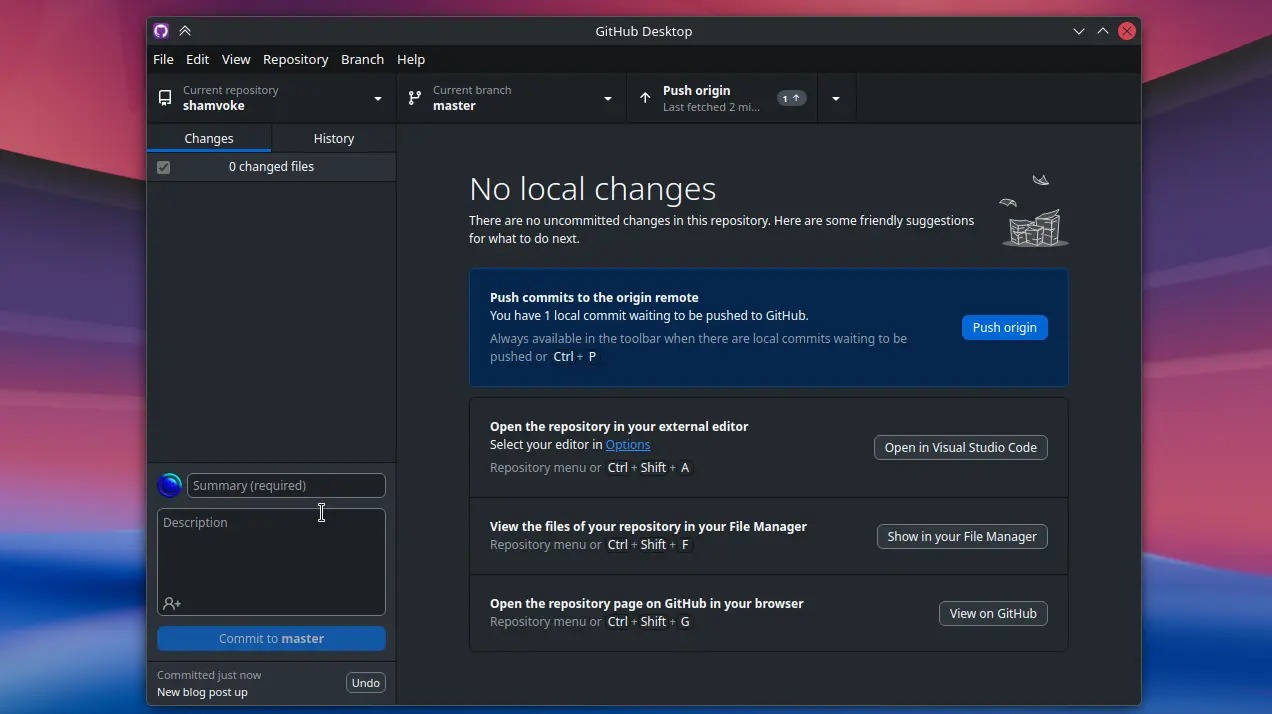
Think of GitHub Desktop as a control centre for your code.
You can see which files have changed, compare old and new versions, save checkpoints of your work, and sync your projects with GitHub.
Instead of typing commands into a terminal, you click through a clean interface that makes it easier to understand what's happening.
The best part? You don't have to write your code inside GitHub Desktop.
Use VS Code, your favourite editor, or an AI coding tool that edits files on your computer. GitHub Desktop helps you track those changes regardless of which editor you use.
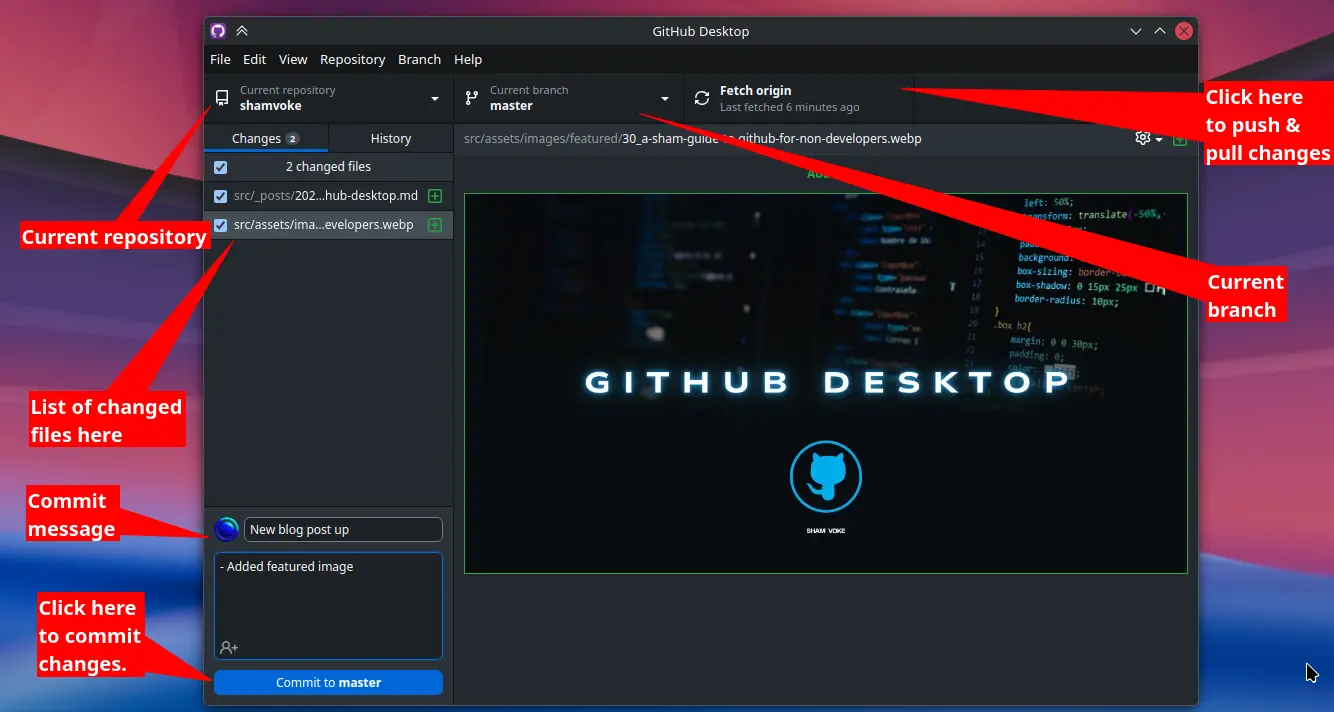
Your editor is where you work. GitHub Desktop is where you keep track of that work.
Simple.
Your Safety Net for Coding With AI
Here's where things get interesting.
AI coding tools can build impressive things in minutes. But they can also break something that was already working, modify files you didn't expect, or turn a simple improvement into an afternoon of debugging.
Without version control, recovering from those mistakes can be frustrating.
With GitHub Desktop, you can inspect the changes your AI has made, compare them with previous versions, and commit your code whenever you reach a good stopping point.
Made a working website? Commit it.
Added a new feature? Commit changes.
About to ask AI to redesign your entire homepage? Push your current working version to GitHub first.
If the experiment goes sideways, you'll have a previous checkpoint to work from.
Just remember that Git doesn't automatically save every change. You need to commit your work, and you should review and test AI-generated code before accepting it.
AI helps you build faster. GitHub Desktop helps you keep track of what you've built.
You Don't Have to Be a Developer
Perhaps you're a designer building a portfolio, a content creator experimenting with a website, or a business owner using AI to create a landing page.
You don't need to become a professional developer to benefit from version control.
With GitHub Desktop, you can start with a project on your computer, add it to the application, review your changes, and publish your repository to GitHub when you're ready.
You can then continue editing your project as usual, using GitHub Desktop to manage checkpoints and track progress along the way.
You can learn the more advanced Git concepts as you go. No need to memorise a dictionary of terminal commands before getting started.
And if you're already a developer, GitHub Desktop is still handy. Sometimes clicking through a visual interface is simply more convenient than typing commands. Sometimes.
Give It a Try
I've always loved tools that make complicated tasks feel simpler, and GitHub Desktop does exactly that. 🔥
It makes version control more approachable without forcing you to change how you work. Whether you're writing every line yourself or letting AI do most of the heavy lifting, having a clear history of your project's changes is incredibly useful.
If you're building anything with code, I highly recommend giving it a try.
Get started here: GitHub Desktop
Stay Curious,
Sham.